Many agents, all at once
Start a conversation while another agent is still working. The sidebar shows who is responding, who needs your approval and what is unread.
- RResearcherneeds approval
- WWriterresponding
- RReviewerresponding
- OOrganizeridle
Early stageComitiva is a young open source project, in development and testing. Expect rough edges and changes between versions.Tell us what breaks
Set up each agent once, with a job, a model and the files and tools it may use. Then talk to all of them in a Slack-style chat: they work at the same time, ask before they change a file, and your team can share them.
v0.3.0 · macOS · Windows · Linux · Free and open source · Apache-2.0 · Early development
What is Comitiva?
Using AI for real work today means one window per provider, pasting the same instructions again and again, and copying files in and out by hand. Comitiva is a desktop app where you define each agent once — a Researcher that reads your notes folder, a Writer that drafts in your house style, a Reviewer with your checklist — and then just talk to them.
An API key (Anthropic, OpenAI-compatible, Google Gemini), a local model through Ollama, or the Claude Code and Codex logins you already use.
A role, a model, the folders and tools it may use, and the guidelines it should follow.
Ask in a chat like Slack. Agents answer in parallel, ask before they change a file, and show what each run cost.
For people and small teams who use AI to research, write, review and organize files — not only to write code.
Connections
Bring API keys, or the command-line harnesses you already use with their own login. Each agent picks a connection and a model, and many agents answer at the same time.
APIs
CLI harnesses
Tools
Local models through Ollama or LM Studio need no key.
What it does
Start a conversation while another agent is still working. The sidebar shows who is responding, who needs your approval and what is unread.
Give an agent local folders (read, or read and write), your Google Drive, or any MCP server you register and test in the app.
Jump to an agent, a conversation or any message. Full text, accents ignored.
Every run's tokens and cost, by connection, agent and model, with your own price corrections and a CSV export.
Paste a screenshot or drop text files into a message. Providers that cannot see images get the file name instead, and the composer tells you before you send.
Export a conversation as Markdown. Export agents with their connections and tools as a file — never with keys — and import them elsewhere.
Everything stays on your computer in SQLite. Keys live in the OS keychain, never in the database. No account needed.
A shortcut for every command, a native menu, light and dark, English and Português (Brasil).
Permissions
Every tool call goes through one permission gate in the runner, for API models and CLI harnesses alike. Claude Code and Codex reach your tools through Comitiva, so their writes ask too.
Inside the agent's folders, listing, reading and searching need no approval.
Anything that changes a file stops the run and asks you inline: Allow, Deny, or Always allow for this agent.
Paths outside the agent's folders are rejected by the server itself, not only by the UI — symlink escapes included.
Per agent: ask before writes, allow writes, or read-only.
Guidelines
Keep your house style, rules and reference notes as guidelines, and choose who gets each one. Comitiva adds them to each agent’s system prompt, after its role, so no prompt carries rules that are not for it.
For what everyone follows: tone, language, who your customers are.
Tag agents “research” or “review” and they get the matching rules, now and later.
Tick a guideline in an agent’s form, like a glossary only the Writer needs.
Already have an AGENTS.md or CLAUDE.md? Import it: each ## section becomes a guideline. Export writes them back as one file.
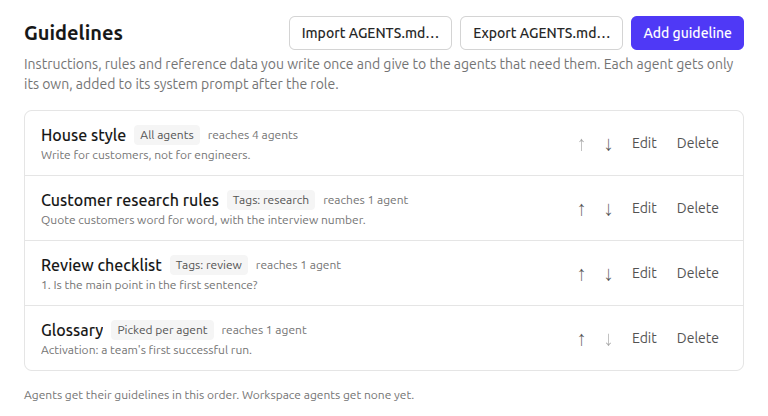
In Comitiva since v0.3.0, tested end to end. For now guidelines are Personal: workspaces on a hub get theirs in Phase 9.
Not a coding tool
Nothing in Comitiva assumes Git, repositories or a terminal. Agents research, write, review and organize. Code is just one case — and when you need it, it comes in as an MCP server like any other tool.
Reads a folder of notes and reports the themes that repeat, with quotes.
Drafts in your Google Drive from a brief, in your house style.
Checks a draft against a checklist and lists what is missing.
Sorts a messy folder into a structure you approve, one move at a time.
Teams
Connect Comitiva to a hub and your team works in shared workspaces: the same agents, the same conversations, and replies that stream in on everyone’s screen. The hub is optional — without one, Comitiva is Personal and stays on your computer.
Owners, admins and members. You invite by link: it works once, for 7 days, and only for the address you invited.
A shared agent names a provider and a model, never a connection. Each member links it to one of their own connections, so no API key is ever shared.
Whoever sends a message runs the turn on their own computer, and the others see the reply stream in under that person’s name. The header says whose computer is running it.
Only the person whose computer runs a reply can allow a write — the file is on their computer. The others see that it is waiting for them.
···Researcher is replying…
Researcher wants to write a file
Waiting for Ana’s answer
What never leaves your computer
In Comitiva since v0.2.0: two desktops on one live conversation, tested end to end against the hub’s own image.
The hub is a separate server you can host yourself (Apache-2.0). The official hosted hub will run at app.comitiva.dev. How the hub works
How it is built
All LLM execution — adapters, streaming, cancellation, the tool loop, MCP clients, approvals and usage — lives in the runner, a plain Node process with a JSON-lines protocol. Electron is one client of it; in a workspace, the same interface talks to a hub instead.
Interface
React · talks only to a Backend
Desktop shell
Electron · SQLite · OS keychain
Runner
adapters · tool loop · approvals · usage
LLM providers
APIs and CLI harnesses
MCP servers
filesystem · Google Drive · yours
Huboptional
workspaces · a remote Backend
One process owns execution. Any shell can drive it: the desktop today, a server or a CLI tomorrow.
SQLite for everything, the OS keychain for secrets. Without a hub, everything works offline. The hub is optional and syncs.
Entities, message blocks and events are published as JSON Schema, so the TypeScript desktop and the PHP hub speak the same language.
What's next
Comitiva starts on your computer and grows into a shared workspace on a hub. The desktop stays local-first; the hub is optional.
macOS, Windows and Linux. Connections, agents, tools with approvals, attachments, search, usage and cost. Checks for updates on its own.
Accounts, workspaces, shared agents each member runs with their own connection, and replies that stream in on everyone’s screen. Host it yourself: one Docker image and Postgres.
The same interface in the browser, served by the hub. Team API keys, and API agents running on the server, so teammates without the desktop can talk to them. An online desktop can run CLI harnesses and local tools on the team's behalf.
Limits and concurrency per agent, and fallback: an agent switches connection when it hits a limit.
Free and open source. Works fully on your computer, no account.
Apache-2.0
The hub, open source, on your own servers: one Docker image and Postgres. For teams that host their own tools.
Apache-2.0
The hub, run by us. Billed by usage.
app.comitiva.dev
Comitiva is early and built in the open. Read the spec, the architecture decisions and the code. Open an issue, send a pull request, or watch the releases: reports from real use help the most.
Apache-2.0